
macOS · native · free
Reclaim the disk space your dev tools quietly eat.
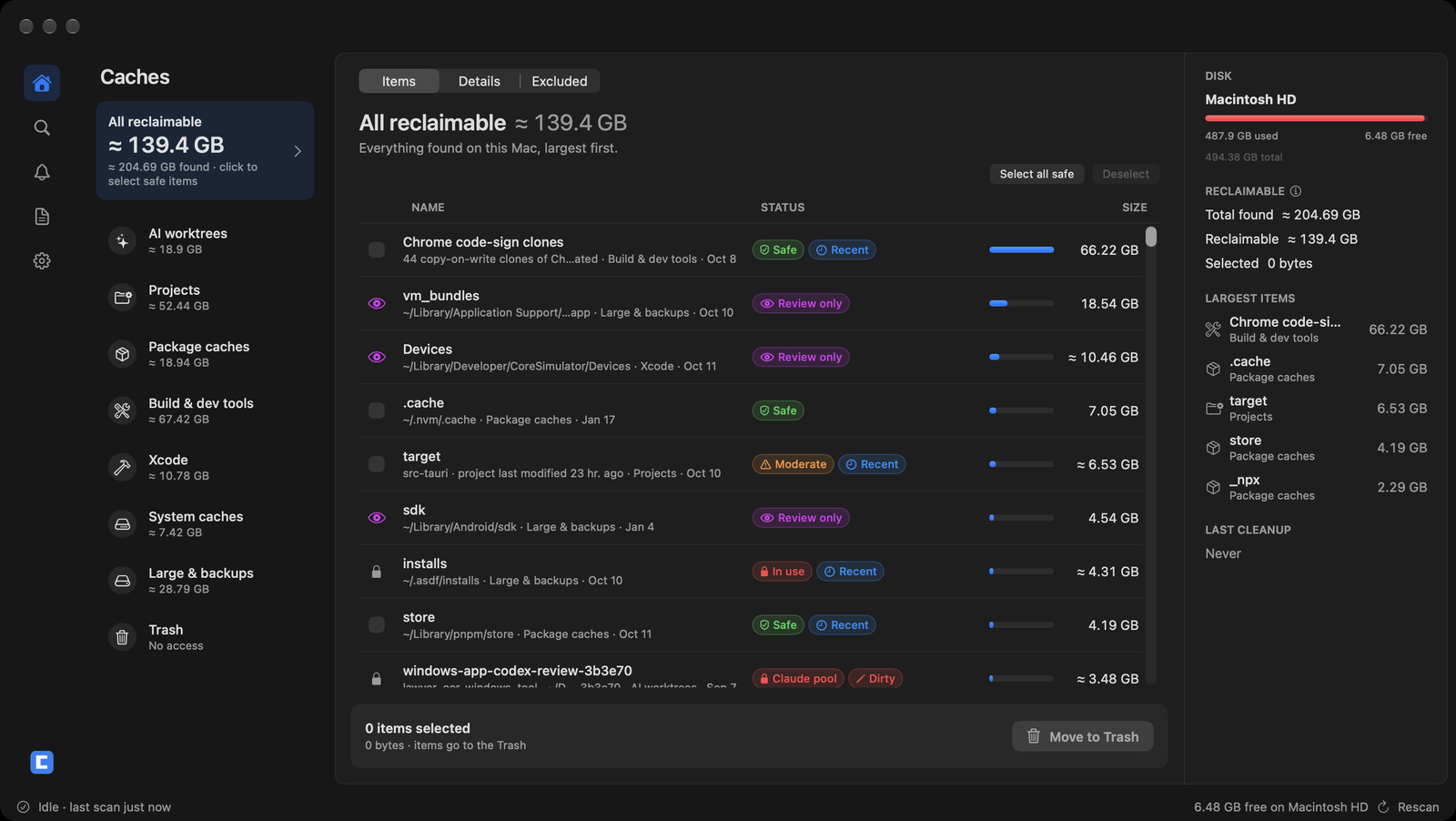
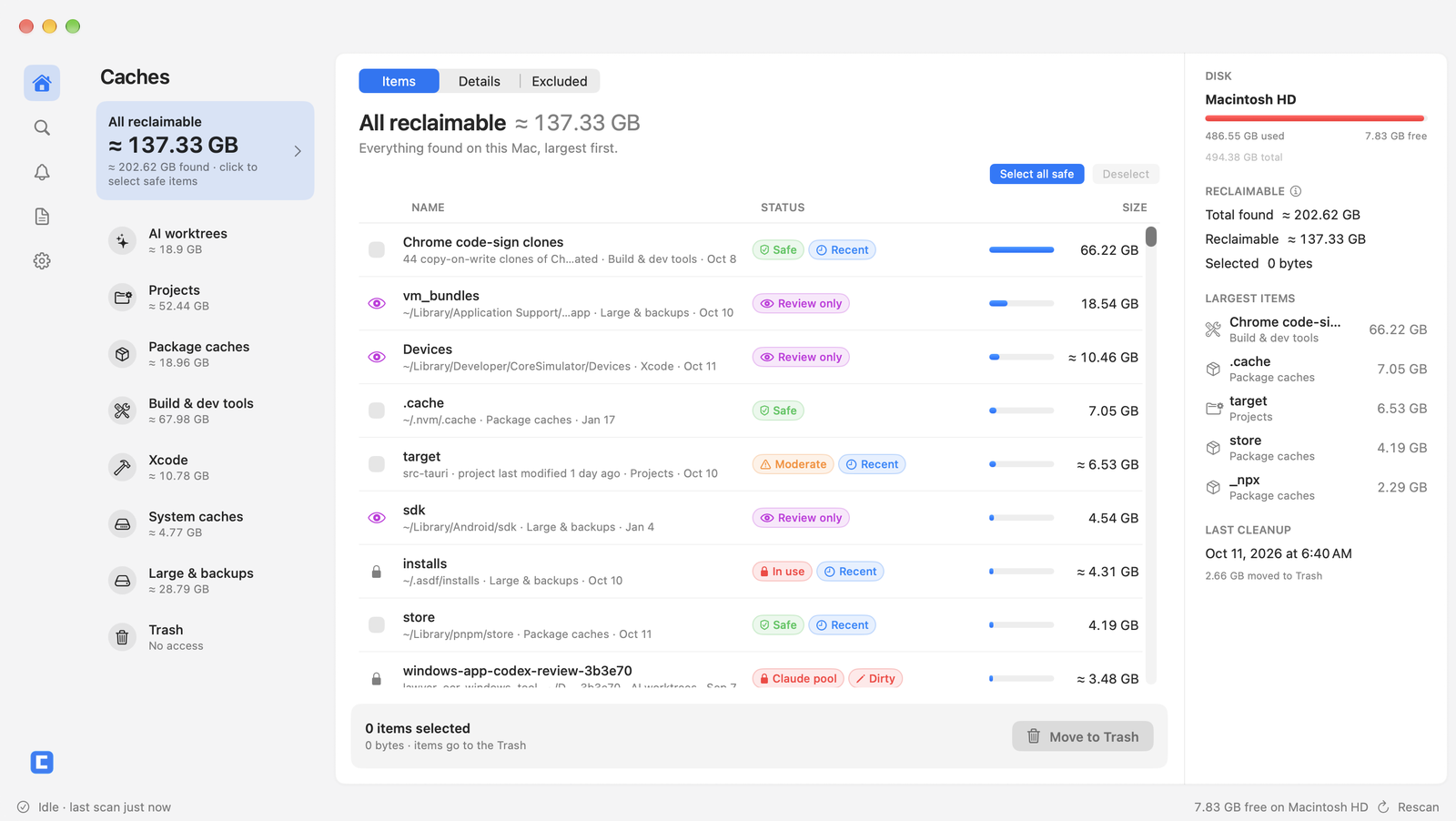
Free My Disk finds the gigabytes developer tools leave behind: abandoned AI coding worktrees, package manager caches, Xcode DerivedData, stale node_modules. It tells you what is safe to clear, locks anything still in use, then moves only what you pick to the Trash.
Free · macOS 14 Sonoma or later
- Deletes to
- Trash only
- Telemetry
- None
- Background daemon
- None
- Requires
- macOS 14+
Six places your free space disappears to.
Not a generic “system junk” sweeper. Free My Disk knows the specific folders developer tools fill up, and how each one is rebuilt.
-
AI coding worktrees
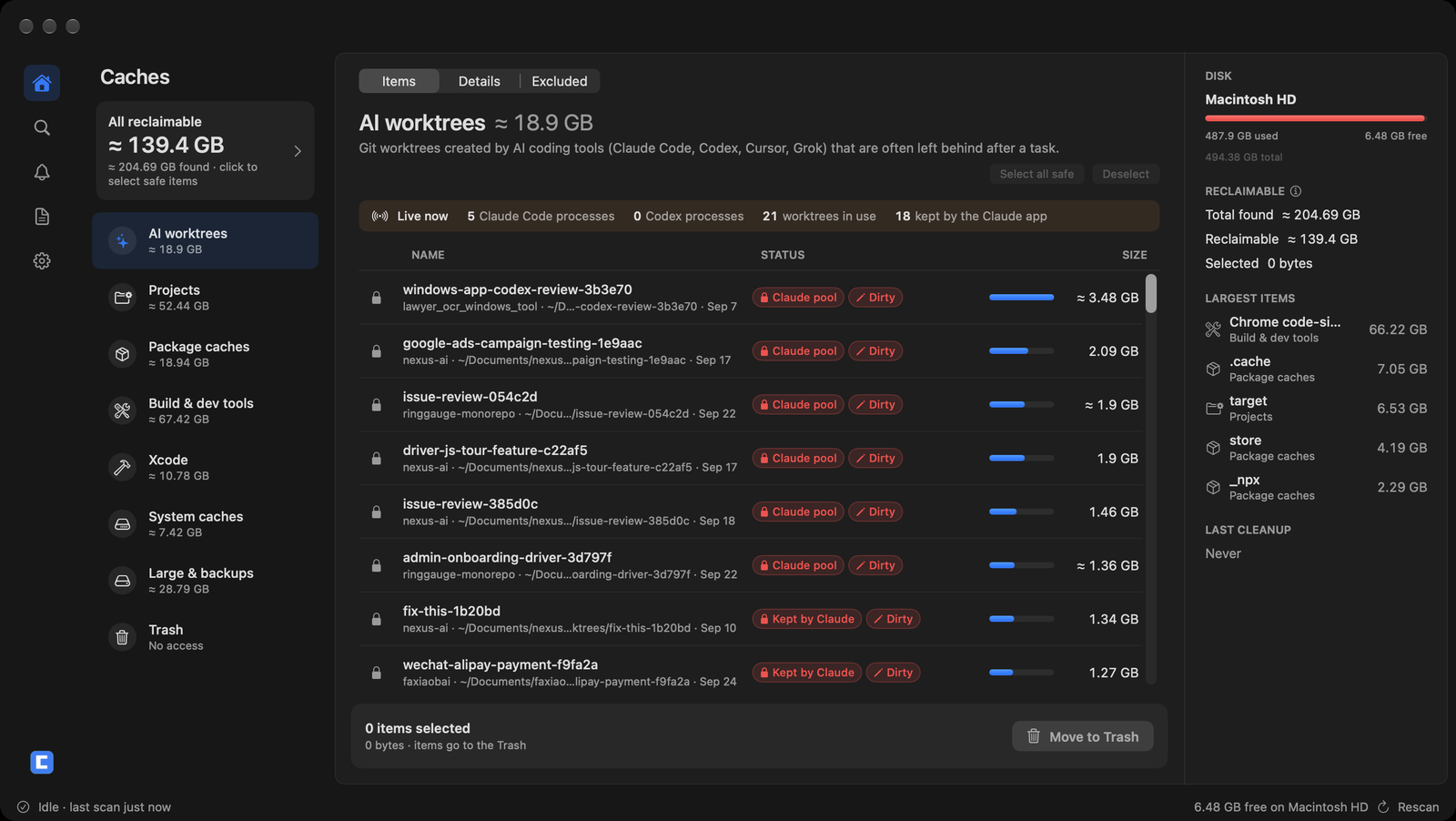
Finds the worktrees Claude Code, Codex, Cursor and Grok leave in <repo>/.claude/worktrees, ~/.codex, ~/.cursor and ~/.grok. Every row says Dirty, Unpushed, Registered or Orphaned, and only clean ones can be ticked.
-
Package caches
npm, pnpm, Yarn, Bun, pip, uv, Cargo, Go, Homebrew, CocoaPods, SwiftPM, Gradle, Maven and more. Where a tool can say where its cache lives, Free My Disk asks it instead of guessing.
-
Xcode
DerivedData, iOS DeviceSupport, SwiftUI previews and simulator caches. Archives and simulator devices are listed for review only. The two newest DeviceSupport versions are never auto-selected.
-
Project leftovers
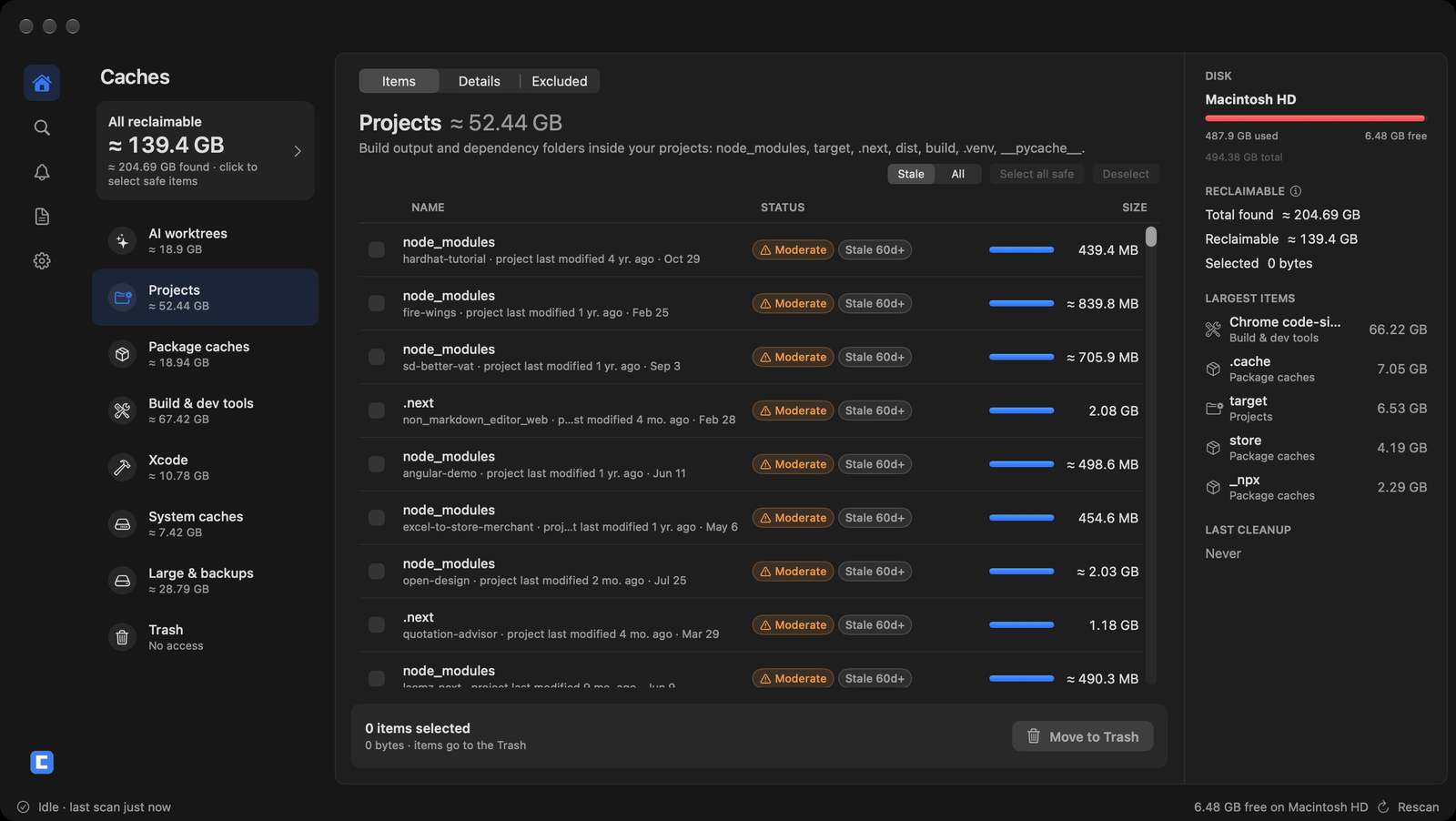
node_modules, target, .venv, .next, dist, build and __pycache__ in projects untouched for 60 days or more. Slow to reinstall, but nothing is lost.
-
Menu-bar Quick Clean
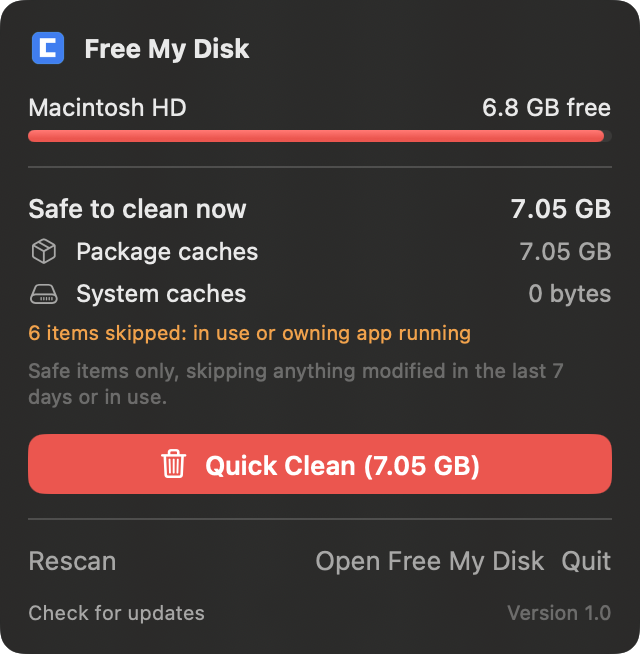
Free space and what is safe to clean right now, from the menu bar. Quick Clean takes two clicks, skips anything in use, and cancels itself after 5 seconds. Menu bar full? ⌘⇧C opens the same selection in the main window.
-
Native and lightweight
Swift and SwiftUI, with one dependency: Sparkle, for automatic updates. No Electron, no background daemon, no account, no telemetry. Developer ID signed and notarized by Apple.
Scan. Review. Trash.
Three steps, and the second one is yours. Nothing leaves your disk until you say so.
- 01
Scan
Sizes every known location in your home folder, ~/Library and project roots in parallel, and checks what is in use. A scan reads; it never changes anything.
// read-only pass ~/ ~/Library ~/Documents/** → size · tier · in use · git status - 02
Review by safety tier
Every row carries one tier. Safe items regenerate on their own, moderate items are opt-in, review items are never selectable. A lock outranks all three.
- Safe Regenerated automatically. Ticked by “Select all safe” and Quick Clean.
- Moderate Opt-in. Slow to rebuild, or may hold something you want. Never ticked for you.
- Review Not selectable. Open it in Finder and decide yourself.
- Locked In use, Kept by Claude, Claude pool or Cannot verify. Never selectable.
- 03
Move to Trash
What you confirm goes to the macOS Trash, where you can still put it back, worktrees included. For a few caches you can run the tool’s own cleanup instead; it is refused while that tool is running.
// “Prune with …”: the only actions that skip the Trash
pnpm store prune
uv cache prune
go clean -modcache
brew cleanup -s
npm cache verify
docker system prune -f
xcrun simctl delete unavailable
conda clean -y -a
Built so a cleanup never costs you work.
A disk cleaner earns trust by what it refuses to do. These rules are enforced in code, not left to a confirmation dialog.
// never trashed: the Trash step refuses these
~/.claude/projects        ~/.claude/sessions
~/.claude/settings.json   ~/.claude/history.jsonl
~/.claude/plugins         ~/.claude/skills
~/.codex/sessions         ~/.codex/config.toml
~/Library/Application Support/Claude/vm_bundles
/private/tmp/claude-<uid>
~/.ollama/models  ~/.lmstudio  ~/.ssh  ~/Library/Keychains

// a lock outranks every tier
In use  Kept by Claude  Claude pool  Cannot verify

// automatic selection skips
modified within 7 days · temp files under 72 h
worktrees with uncommitted or unpushed work

// after trashing a registered worktree
git worktree prune

// the only destructive call
move to ~/.Trash-
Trash only, never rm
Everything you pick goes to the Trash, worktrees included, and the app never empties it. The one exception is a “Prune with …” action, which runs that tool’s own cleanup after you confirm, and is refused while the tool runs.
-
Only clean worktrees can be selected
A worktree is selectable only when git reports it clean, untracked and ignored files included, with no commits missing from every remote. Full clones are never removed. After a registered worktree is trashed, git worktree prune tidies its repository.
-
Recent files are left alone
Anything modified in the last 7 days is never auto-selected. Temporary files must be 72 hours old, and Projects shows only projects untouched for 60 days or more unless you ask for all.
-
In use beats every tier
Files open by a process, a process’s working directory, worktrees the Claude desktop app keeps or pools, worktrees a Claude Code session used in the last 24 hours, git locks: each one locks the row, and all of it is checked again right before anything moves. If ps or lsof fails, every row says “Cannot verify” until a rescan succeeds.
-
Running apps are detected
Xcode, Simulator, Chrome, VS Code, Cursor, Docker, Claude Code, the Claude desktop app and Codex are matched by executable path, and their caches are never auto-selected while they run. node, pnpm, uv, Go, Java and other runtimes get a warning before you confirm.
-
Your data is off limits
Never trashed: ~/.claude projects, sessions, settings, history, plugins and skills; ~/.codex sessions and config; the Claude Cowork VM; iOS backups; local models; keychains and mail. A guard refuses them under any spelling, symlink or firmlink.
-
Full Disk Access only if you want it
It is needed only to show how big the Trash is. The app never asks on launch; the Trash row has a button that opens System Settings if you want that number.
-
A fixed, published list of paths
It looks only at known locations, the same ones listed on this page, plus folders you add yourself. No heuristics sweep your disk for “junk”.
What it finds
The exact locations, grouped the way the app groups them. Anything else shows up only if you add it as a custom path.
| Group | Example paths | Tier |
|---|---|---|
| AI worktrees Dirty / Unpushed / Registered / Orphaned on every row; only clean ones can be ticked |
| Moderate |
| Projects Under Documents, Developer, Projects, code, src, repos, work; shown once untouched for 60 days |
| Moderate |
| Package caches ~/.m2 is moderate; Hugging Face and other model caches are review |
| SafeModerateReview |
| Build & dev tools ~/.claude and ~/.codex caches are moderate; sessions and config are never listed |
| SafeModerate |
| Xcode Archives and simulator devices are review |
| SafeReview |
| System caches Each app’s cache folder is its own row; temporary files once 72 hours old |
| SafeModerate |
| Large & backups Size only: iOS backups, the Cowork VM, Docker.raw, conda, Android SDK, local snapshots |
| Review |
| Trash Size only, and only with Full Disk Access. Never emptied |
| Review |
Looks like it belongs on your Mac.
Download
Get your gigabytes back.
Free, native, and done in a minute. Scan first; nothing moves until you choose.
Updates arrive through Sparkle inside the app. Requires macOS 14 Sonoma or later. Developer ID signed and notarized by Apple.